Now in Public Beta

Your Cloud Storage Native in Adobe

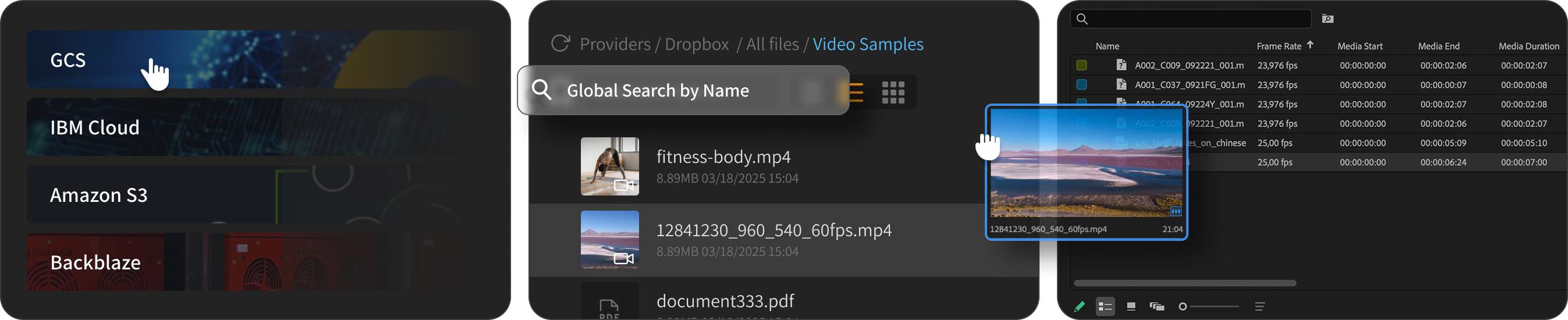
Browse, search, preview, and import cloud media
directly inside your Adobe creative apps —
without moving files or opening storage consoles.

  • Visual search and preview in cloud
  • Drag assets directly to timeline
  • Share projects with zero "Media Offline"

Free plan includes 1 cloud connection. No credit card required.

How it works

From cloud to timeline in seconds

01

Connect your storage

Use your existing S3, Backblaze, or GCS buckets.

Your files appear instantly

02

Search and preview media

Find files, inspect metadata, and preview assets before downloading.

Find what you need in seconds

03

Use files in Adobe

Import, drag to timeline, or share projects without relinking chaos.

Start editing immediately
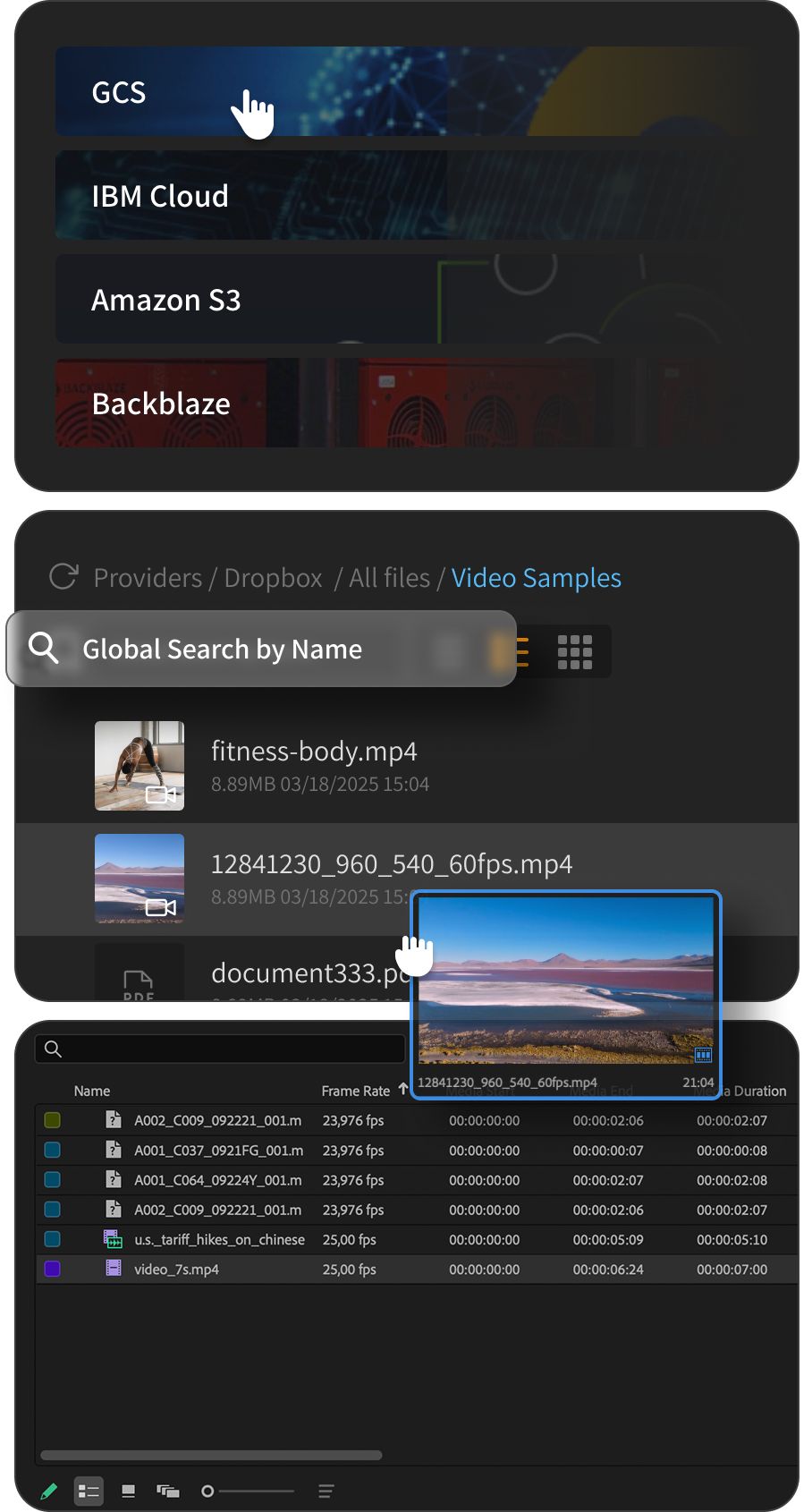
Cloud providers flow into editing workflow

Works with S3, Backblaze, Dropbox — and more

Adobe Creative Cloud

Built for Adobe creative workflows

Sofile runs inside Adobe apps, so your team can browse, search, preview, import, and share cloud assets without leaving the creative workflow.

Designed for Adobe Creative Cloud workflows

Built for editors, designers, and production teams working across video, audio, design, and publishing.


Designed for Adobe Creative Cloud
Adobe Technology Partner Community
  • Runs inside Adobe applications
  • Built for professional media workflows
  • Works with cloud storage directly in your creative tools

Supported Adobe apps

Use Sofile across the Adobe tools your team already works in.

  • Adobe Premiere Pro
  • Adobe After Effects
  • Adobe Photoshop
  • Adobe Illustrator
  • Adobe InDesign
  • Adobe Audition
  • Adobe InCopy

Feature availability may vary by host application.

Storages

Works with your cloud storage

Sofile connects to leading cloud storage providers, so you can browse, manage, and share assets from the storage provider that fits your workflow.

  • DropboxDropbox
  • OneDriveOneDrive
  • Google DriveGoogle Drive
  • IBM COSIBM COS
  • Google Cloud StorageGCS
  • Amazon S3Amazon S3
  • Backblaze B2Backblaze B2

Provider capabilities vary by API and storage model.

Built for editors

Built for editors, not storage admins.

Cloud storage consoles are made for infrastructure.
Sofile turns the same buckets into a visual media workspace inside Adobe.

S3
AWS S3 Console
C001_V1_001.mp4320 MB
C001_V1_002.mp4320 MB
C001_V1_003_FINAL.mp4320 MB
C001_V1_003_FINAL_v2.mp4320 MB
interview_raw_01.mov320 MB
interview_raw_02.mov320 MB
broll_drone_sunset.mp4320 MB
broll_drone_sunset_graded.mp4320 MB
C001_V1_003_FINAL_v3.mp4320 MB
Providers/Dropbox/Video Samples
Global search by name
Name A–Z
12841230_9.mp4
Play
01:45

12841230_9.mp4

8.89 MB 03/18/2025 15:04
Interview_raw.mp4
Play
08:12

Interview_raw.mp4

8.89 MB 03/18/2025 15:04
Audio file

sound.wav

8.89 MB 03/18/2025 15:04
Nature.jpg

Nature.jpg

8.89 MB 03/18/2025 15:04
City.jpg

City.jpg

8.89 MB 03/18/2025 15:04
PDF file

document_543.pdf

8.89 MB 03/18/2025 15:04
Before
After

Cloud Console

  • Cryptic object keys and folder paths
  • No visual previews before download
  • Browser tabs outside your editing workflow
  • Manual downloads and relinking
  • Hard to know what a file actually is

Sofile

  • Search cloud buckets from inside Adobe
  • Preview thumbnails, video, audio, and metadata
  • Drag assets directly to your timeline
  • Share projects without "Media Offline" errors
  • Keep files in your own cloud storage.
Core Features

The Core Trio

Find any file in seconds

Portable index searches across all your buckets locally. No servers, no waiting.

Search petabytes in milliseconds.

See inside your cloud

Auto-generated thumbnails replace cryptic filenames.

Preview before you download.

Share without headaches

Export projects with linked cloud assets. Recipients get everything synced.

Zero "Media Offline" errors.

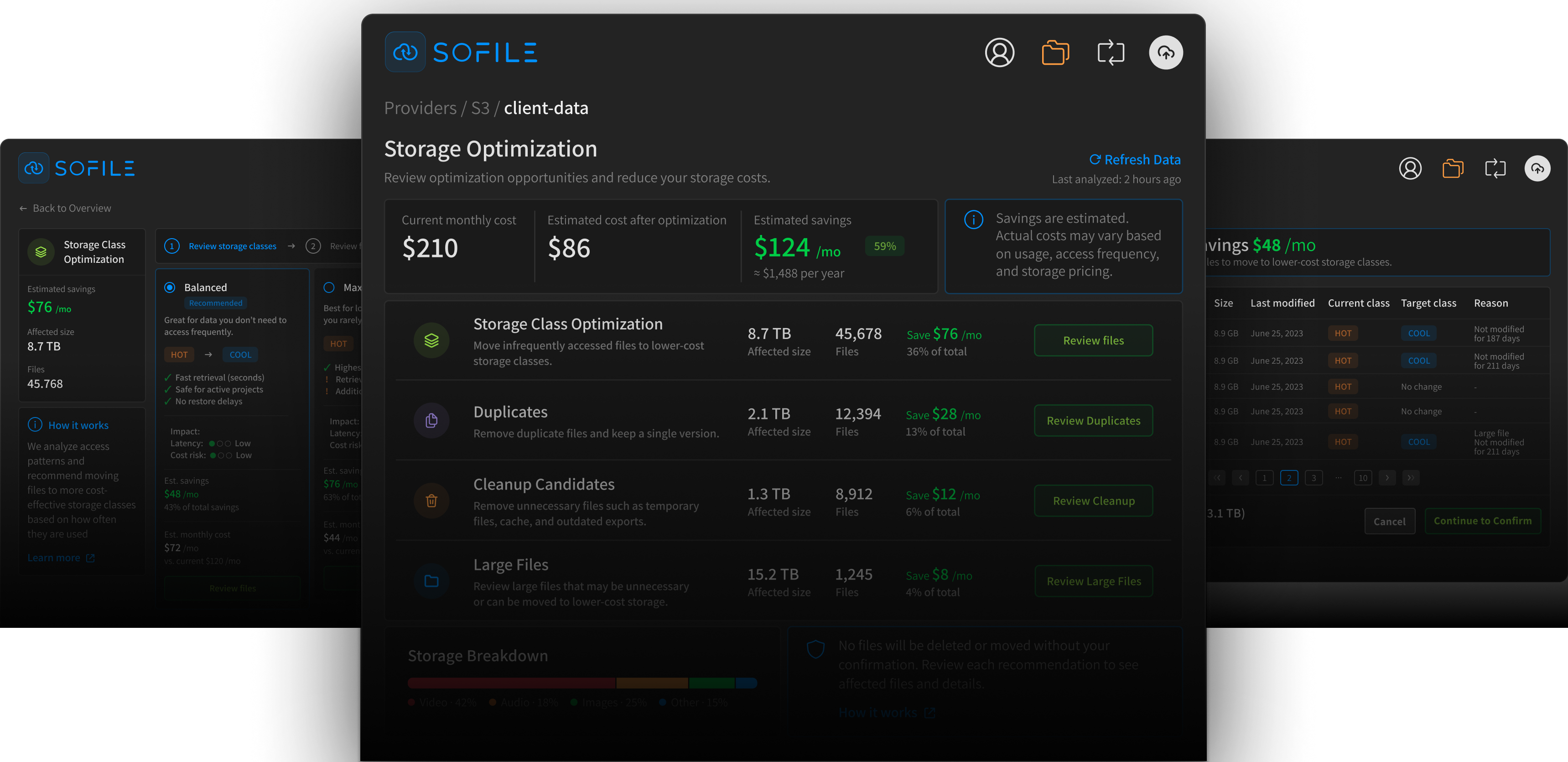
Storage Insights

Find storage waste, duplicates, large files,
and provider-specific optimization opportunities.

Sofile analyzes your indexed buckets to surface duplicate files, large assets, old media, and storage class opportunities where supported.
Cloud providers flow into editing workflow

Example: Storage Class Optimization for Amazon S3

Daily Toolkit

Your daily media workflow

Everything you do — faster, clearer, reliable.

See inside files

Preview video & audio instantly.

Batch renaming files

Fix filenames in seconds.

Tag and describe

Your metadata matters.

Reliable uploads

Transfers under controle.

See all versions

Don't loose changes.

Render and upload

Automatically. Don't wait.

Secure by Design

Direct connection via official APIs. We don't store your files —
we just make them visible.

Files stay in your cloud. Credentials are encrypted. We only provide the interface.

AES-256 encryption
OAuth2-powered authentication. Your identity stays yours.
Direct API access — your data never passes through us
Pricing

Choose your plan

From personal editing workflows to studio-scale media operations.

Free

Try Sofile with your personal cloud workflow.

$0forever
  • 1 storage provider
  • Reliable transfers
  • List & Grid browsing
  • Preview & metadata
  • Import / export from bins
  • Versions
  • 5 timeline exports
Most Popular

Pro

For solo editors and freelancers.

$25/month + VAT
  • Includes FreeEverything in Free, plus:
  • Up to 3 storage providers
  • Unlimited timeline exports
  • Search
  • Thumbnail previews
  • Presentation linksClient-ready sharing
  • Shared Projects
  • Bulk Rename
For power users

Expert

For those who need complete visibility and control.

$65/month + VAT
  • Includes ProEverything in Pro, plus:
  • Unlimited storage providers
  • Storage Insights
  • Custom metadata
  • Advanced shared workflows
  • Team media context

Advanced optimization and metadata features depend on provider support.

Some advanced features are available only for supported S3-compatible storage providers. See supported providers

Enterprise & Partners

For larger teams, vendors, and storage providers. SSO, white-label panels, custom integrations, and dedicated support.

Contact Sales
Providers

Storage Provider Capabilities

Sofile works with a variety of cloud storage providers. Capabilities vary depending on each provider's native APIs and storage model.

Instant Search

Find content by filename, metadata and more

  • S3-compatible
    Native Index
  • GCS
    Native Index
  • Dropbox
    Provider API
  • Google Drive
    Provider API
  • OneDrive
    Provider API

Thumbnail Previews

Quick visual previews of your media

  • S3-compatible
    Sofile-generated
  • GCS
    Sofile-generated
  • Dropbox
    Native
  • Google Drive
    Native
  • OneDrive
    Native

Presentation Links

Share curated media collections with clients and collaborators

  • S3-compatible
    Available
  • GCS
    Available
  • Dropbox
    Available
  • Google Drive
    Available
  • OneDrive
    Available

Shared Projects

Share project packages and linked assets

  • S3-compatible
    Available
  • GCS
    Available
  • Dropbox
    Available
  • Google Drive
    Available
  • OneDrive
    Available

Storage Insights

Analyze storage usage, waste, large files, and optimization opportunities

  • S3-compatible
    Available
  • GCS
    Available
  • Dropbox
    Not available
  • Google Drive
    Not available
  • OneDrive
    Not available

Sidecar Metadata (MAM-lite)

Enrich, organize, and manage metadata

  • S3-compatible
    Available
  • GCS
    Available
  • Dropbox
    Not available
  • Google Drive
    Not available
  • OneDrive
    Not available

Bulk Rename & Normalize

Rename and normalize files in bulk

  • S3-compatible
    Available
  • GCS
    Available
  • Dropbox
    Available
  • Google Drive
    Available
  • OneDrive
    Available

Advanced Optimization

Provider-aware recommendations for storage cost reduction

  • S3-compatible
    Provider-dependent
  • GCS
    Provider-dependent
  • Dropbox
    Not available
  • Google Drive
    Not available
  • OneDrive
    Not available

Frequently Asked Questions

No. Sofile connects directly to your existing cloud storage via official APIs. Your files stay where they are — we just make them searchable and visible inside Adobe apps. We never copy, cache, or store your media on our servers.

Sofile runs as a panel inside Premiere Pro and Audition. You can search your cloud buckets, preview thumbnails and waveforms, and drag assets directly onto your timeline. Assets are streamed or downloaded on-demand as you edit.

We support AWS S3, Backblaze B2, Wasabi, Google Cloud Storage, Dropbox, and OneDrive. The Free plan connects 1 provider; Pro and Business support unlimited connections.

Share Project lets you export a Premiere or Audition project file with all cloud asset references intact. When a collaborator opens it with Sofile, assets sync automatically from the cloud — no more "Media Offline" errors or manual relinking.

Your cloud credentials are stored locally on your machine with encryption. We use official APIs with read-only mode available for extra safety. Sofile never has direct access to your files — we only generate indexes and thumbnails on your local machine.